 AVA
AVAChoose how AVA turns a question into an answer: a direct query or a reasoning loop. The examples assume ava already has a loaded source, as shown in Analyze data.
Choose a strategy
Choose a strategy per analyze() call:
| Strategy | What it does | When to use it |
|---|---|---|
direct | Generate a query, execute it, and optionally summarize. Can retry failed execution with a corrected query. | Start here for a focused question. |
loop | Explore, reason, and execute queries over multiple steps before returning an answer. | Questions that benefit from intermediate exploration. |
Strategy options
All strategy inputs are nested under config.strategy:
| Field | Type | Required | Default / behavior |
|---|---|---|---|
type | 'direct' or 'loop' | When strategy is provided | Selects the strategy. |
maxRetries | number | No; direct only | 2 correction retries after the first attempt when type: 'direct' is explicit. |
maxSteps | number | No; loop only | 12 normal reasoning steps. |
Direct
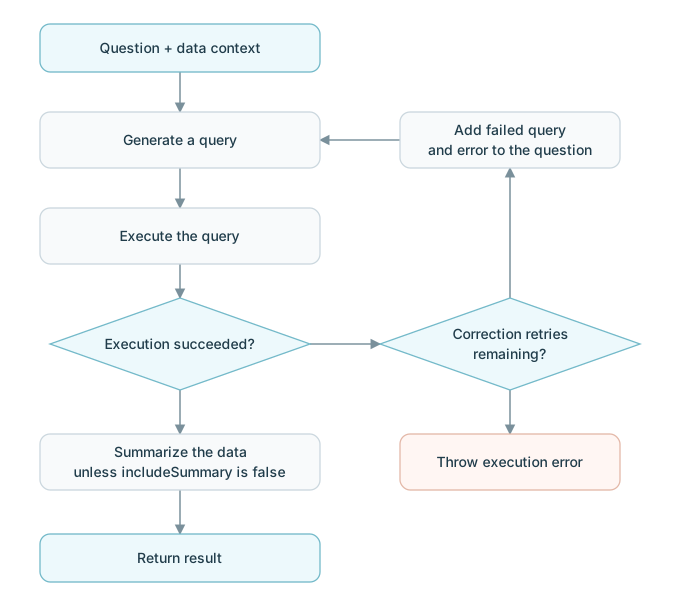
Generate a query from the question and data context, execute it, then optionally summarize the returned data. Only failed execution enters the correction loop.
const result = await ava.analyze('What is total revenue by region?', {
  strategy: { type: 'direct', maxRetries: 2 },
});
With this configuration, a failed execution can be corrected twice after the initial attempt. In the current implementation, omitting strategy entirely follows the direct path with 10 correction retries. Set it explicitly for a predictable budget. Model API retries are separately controlled by llm.maxRetries (default 3).
Query-generation and summary failures propagate to the caller; they do not restart the execution correction loop. With includeSummary: false, the result's text is an empty string.
Loop
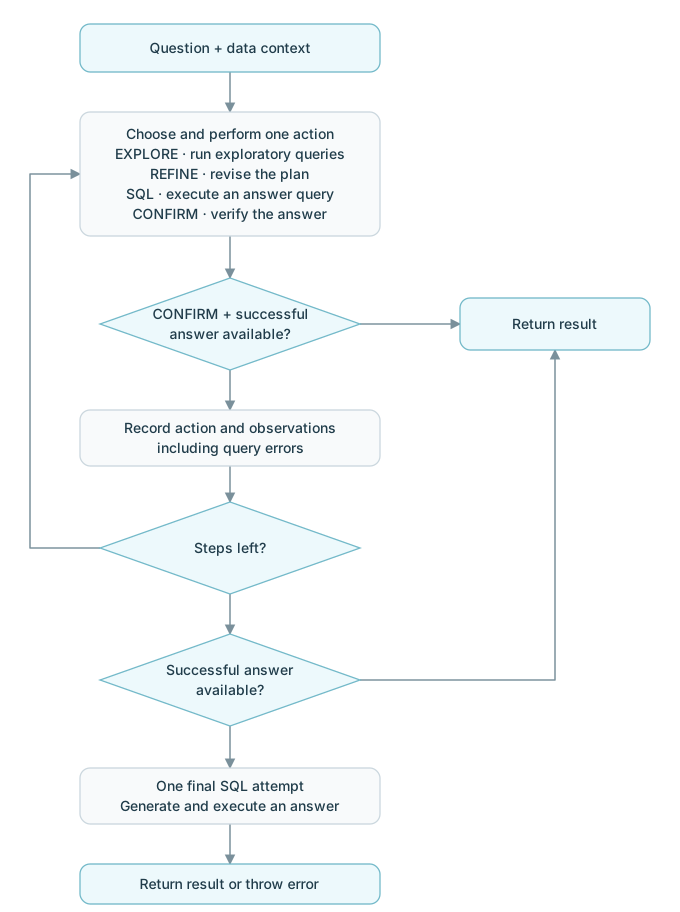
The model chooses one action at each step using the question, data context, and accumulated history. Exploration is optional: it can go straight to an answer query when it has enough information.
| Action | What happens | What happens next |
|---|---|---|
EXPLORE | Execute one or more exploratory queries to check values, formats, or relationships. | Add results or execution errors to the history for the next step. |
REFINE | Revise the understanding and plan without executing a query. | Add the plan to the history and take another step. |
SQL | Execute one candidate answer query in the engine's language. | Save the successful result, or record the execution error so a later step can correct it. |
CONFIRM | Verify that the executed answer addresses the question. | Return the saved result if one exists; otherwise continue the loop. |
SQL is the action tag even when the engine executes a language other than SQL. These actions are choices, not a fixed four-step sequence.
const result = await ava.analyze('Compare regional revenue and explain the differences', {
  strategy: { type: 'loop', maxSteps: 6 },
});
maxSteps limits normal reasoning steps. At the limit, AVA returns an available successful answer without requiring another CONFIRM. If no successful answer is available, it makes one additional query-generation and execution attempt using the full history. This final attempt returns directly on success and throws on failure.
Execution errors inside the normal loop become feedback for the next step. Model-call failures and invalid action responses stop the analysis instead. Model API retries still follow llm.maxRetries, so maxSteps is not a strict count of all model calls.
On the usual CONFIRM path, text contains the verification and conclusion. At the step limit or after the final attempt, it uses an earlier confirmation if present, otherwise the result data serialized as JSON. includeSummary: false always leaves text empty; Loop does not run a separate summarization call.